FANUC R-J2 – How To Remaster A Single Axis

Remastering a single axis.

Note: When remastering axis 2 or 3, both axis 2 and 3 must be remastered due axis 2/3 coupling.

  1. Press the COORD key. Cycle through to the JOINT coordinates. Press ENTER key.
  2. Enable teach pendant DEADMAN switch.
  3. Turn teach pendant switch to ON position.
  4. Move robot axis approximately 15 degrees past zero position in both directions.
  5. Move robot axis to zero position.
  6. Press MENU key.
  7. Scroll to SYSTEM. Press ENTER key.
  8. Press F1 key for TYPE.
  9. Scroll to VARIABLE. Press ENTER key.
  10. Scroll to $MASTER_ENB.
  11. Enter the value 1. Press ENTER key.
  12. Press F1 TYPE key.
  13. Scroll to MASTER/CAL. Press ENTER key.
  14. Scroll to item 4 SINGLE AXIS MASTER. Press ENTER key.
  15. Scroll down to required axis and over to MSTRPOS column.
  16. Enter the value 0. Press ENTER key.
  17. Scroll over to SEL column.
  18. Enter the value 1. Press ENTER key.
  19. Press F5 key for EXEC.
  20. Press PREV key.
  21. Scroll to item 6 CALIBRATE. Press ENTER key.
  22. Press F4 key for YES.
  23. Completed

Legend: Physical Key, Digital Option.

As always, let us know how this worked out for your project in the comments section below.
FANUC R-J3 – How To Remaster A Single Axis

Remastering a single axis.

Note: When remastering axis 2 or 3, both axis 2 and 3 must be remastered due axis 2/3 coupling.

  1. Press the COORD key. Cycle through to the JOINT coordinates. Press ENTER key.
  2. Enable teach pendant DEADMAN switch.
  3. Turn teach pendant switch to ON position.
  4. Move robot axis approximately 15 degrees past zero position in both directions.
  5. Move robot axis to zero position.
  6. Press MENU key.
  7. Scroll to SYSTEM. Press ENTER key.
  8. Press F1 key for TYPE.
  9. Scroll to VARIABLE. Press ENTER key.
  10. Scroll to $MASTER_ENB.
  11. Enter the value 1. Press ENTER key.
  12. Press F1 TYPE key.
  13. Scroll to MASTER/CAL. Press ENTER key.
  14. Scroll to item 4 SINGLE AXIS MASTER. Press ENTER key.
  15. Scroll down to required axis and over to MSTRPOS column.
  16. Enter the value 0. Press ENTER key.
  17. Scroll over to SEL column.
  18. Enter the value 1. Press ENTER key.
  19. Press F5 key for EXEC.
  20. Press PREV key.
  21. Scroll to item 6 CALIBRATE. Press ENTER key.
  22. Press F4 key for YES.
  23. Completed

Legend: Physical Key, Digital Option.

As always, let us know how this worked out for your project in the comments section below.
FANUC R-J3iB – How To Remaster A Single Axis

Remastering a single axis.

Note: When remastering axis 2 or 3, both axis 2 and 3 must be remastered due axis 2/3 coupling.

  1. Press the COORD key. Cycle through to the JOINT coordinates. Press ENTER key.
  2. Enable teach pendant DEADMAN switch.
  3. Turn teach pendant switch to ON position.
  4. Move robot axis approximately 15 degrees past zero position in both directions.
  5. Move robot axis to zero position.
  6. Press MENU key.
  7. Scroll to SYSTEM. Press ENTER key.
  8. Press F1 key for TYPE.
  9. Scroll to VARIABLE. Press ENTER key.
  10. Scroll to $MASTER_ENB.
  11. Enter the value 1. Press ENTER key.
  12. Press F1 TYPE key.
  13. Scroll to MASTER/CAL. Press ENTER key.
  14. Scroll to item 4 SINGLE AXIS MASTER. Press ENTER key.
  15. Scroll down to required axis and over to MSTRPOS column.
  16. Enter the value 0. Press ENTER key.
  17. Scroll over to SEL column.
  18. Enter the value 1. Press ENTER key.
  19. Press F5 key for EXEC.
  20. Press PREV key.
  21. Scroll to item 6 CALIBRATE. Press ENTER key.
  22. Press F4 key for YES.
  23. Completed

Legend: Physical Key, Digital Option.

As always, let us know how this worked out for your project in the comments section below.

FANUC R-J3iC – How To Remaster A Single Axis

Remastering a single axis.

Note: When remastering axis 2 or 3, both axis 2 and 3 must be remastered due axis 2/3 coupling.

  1. Press the COORD key. Cycle through to the JOINT coordinates. Press ENTER key.
  2. Enable teach pendant DEADMAN switch.
  3. Turn teach pendant switch to ON position.
  4. Move robot axis approximately 15 degrees past zero position in both directions.
  5. Move robot axis to zero position.
  6. Press MENU key.
  7. Scroll to SYSTEM. Press ENTER key.
  8. Press F1 key for TYPE.
  9. Scroll to VARIABLE. Press ENTER key.
  10. Scroll to $MASTER_ENB.
  11. Enter the value 1. Press ENTER key.
  12. Press F1 TYPE key.
  13. Scroll to MASTER/CAL. Press ENTER key.
  14. Scroll to item 4 SINGLE AXIS MASTER. Press ENTER key.
  15. Scroll down to required axis and over to MSTRPOS column.
  16. Enter the value 0. Press ENTER key.
  17. Scroll over to SEL column.
  18. Enter the value 1. Press ENTER key.
  19. Press F5 key for EXEC.
  20. Press PREV key.
  21. Scroll to item 6 CALIBRATE. Press ENTER key.
  22. Press F4 key for YES.
  23. Completed

Legend: Physical Key, Digital Option.

As always, let us know how this worked out for your project in the comments section below.

FANUC R-30iA – How To Remaster A Single Axis

Remastering a single axis.

Note: When remastering axis 2 or 3, both axis 2 and 3 must be remastered due axis 2/3 coupling.

  1. Press the COORD key. Cycle through to the JOINT coordinates. Press ENTER key.
  2. Enable teach pendant DEADMAN switch.
  3. Turn teach pendant switch to ON position.
  4. Move robot axis approximately 15 degrees past zero position in both directions.
  5. Move robot axis to zero position.
  6. Press MENU key.
  7. Scroll to SYSTEM. Press ENTER key.
  8. Press F1 key for TYPE.
  9. Scroll to VARIABLE. Press ENTER key.
  10. Scroll to $MASTER_ENB.
  11. Enter the value 1. Press ENTER key.
  12. Press F1 TYPE key.
  13. Scroll to MASTER/CAL. Press ENTER key.
  14. Scroll to item 4 SINGLE AXIS MASTER. Press ENTER key.
  15. Scroll down to required axis and over to MSTRPOS column.
  16. Enter the value 0. Press ENTER key.
  17. Scroll over to SEL column.
  18. Enter the value 1. Press ENTER key.
  19. Press F5 key for EXEC.
  20. Press PREV key.
  21. Scroll to item 6 CALIBRATE. Press ENTER key.
  22. Press F4 key for YES.
  23. Completed

Legend: Physical Key, Digital Option.

As always, let us know how this worked out for your project in the comments section below.

FANUC R-30iB – How To Remaster A Single Axis

Remastering a single axis.

Note: When remastering axis 2 or 3, both axis 2 and 3 must be remastered due axis 2/3 coupling.

  1. Press the COORD key. Cycle through to the JOINT coordinates. Press ENTER key.
  2. Enable teach pendant DEADMAN switch.
  3. Turn teach pendant switch to ON position.
  4. Move robot axis approximately 15 degrees past zero position in both directions.
  5. Move robot axis to zero position.
  6. Press MENU key.
  7. Scroll to SYSTEM. Press ENTER key.
  8. Press F1 key for TYPE.
  9. Scroll to VARIABLE. Press ENTER key.
  10. Scroll to $MASTER_ENB.
  11. Enter the value 1. Press ENTER key.
  12. Press F1 TYPE key.
  13. Scroll to MASTER/CAL. Press ENTER key.
  14. Scroll to item 4 SINGLE AXIS MASTER. Press ENTER key.
  15. Scroll down to required axis and over to MSTRPOS column.
  16. Enter the value 0. Press ENTER key.
  17. Scroll over to SEL column.
  18. Enter the value 1. Press ENTER key.
  19. Press F5 key for EXEC.
  20. Press PREV key.
  21. Scroll to item 6 CALIBRATE. Press ENTER key.
  22. Press F4 key for YES.
  23. Completed

Legend: Physical Key, Digital Option.

As always, let us know how this worked out for your project in the comments section below.

Benshaw-(RB2, RC2, RX2E) How To Set Passcode

Purpose: This will unlock advanced parameters. The following steps must be performed to set a passcode using the KPMX3CBL2M LCD Display:

  1. At the default meter display, press the MENU key to enter the Menu mode.
  2. Press the UP or DOWN keys to get to the FUN parameters.
  3. Press the ENTER key
  4. Press the UP or DOWN keys to get to the FUN 16.
  5. Press the ENTER key. “Off ” is displayed to indicate that no passcode is currently set.
  6. Press the UP or DOWN keys and ENTER for each digit to be defined, enter 0519 starting at the most significant digit.
  7. Press the ENTER key to set the passcode.

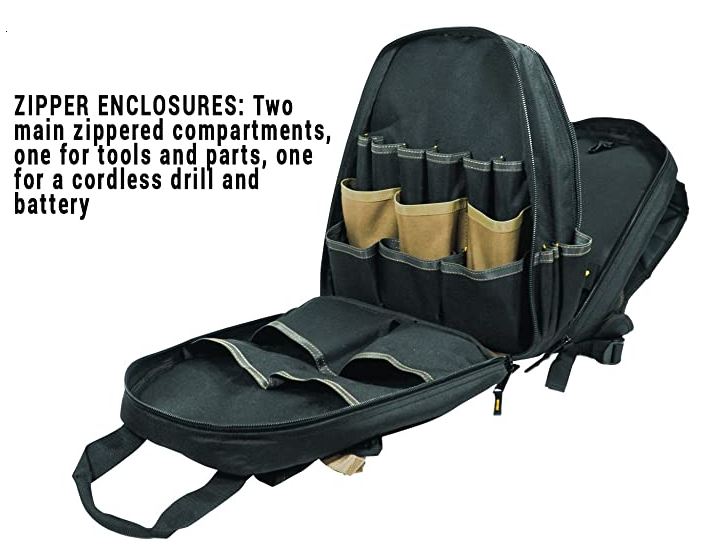
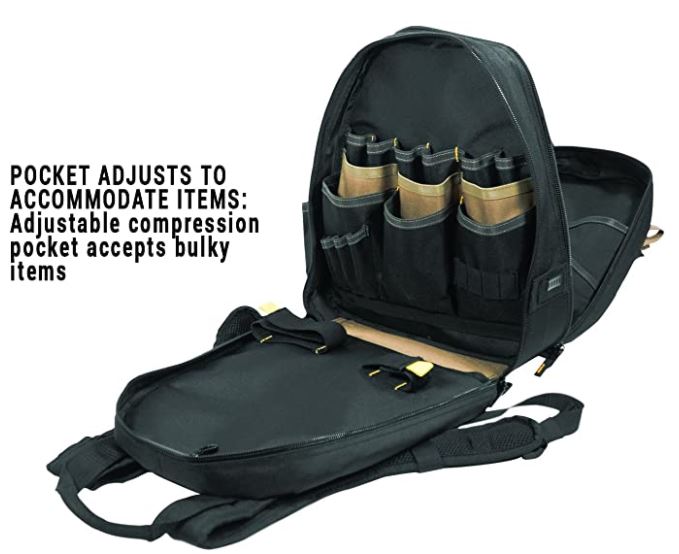
Custom Leathercraft 1134 Tool Backpack, 48-Pocket

B0047O3PFC – Check Pricing

An excellent solution for electricians that need to transport tools while still having their hands free whether for climbing ladders or carrying bulky replacement parts.

My thoughts

I can honestly say I literally own this tool bag (correction I own two for work & home). There might be better tool bags out there, but I feel this one is the best value for dollar. I’m able to fit everything I need including a cordless drill & impact.

Two points to keep in mind.

One, it doesn’t stand up on it’s own as well as I hoped. However balancing your tool placement improves this.

Two, when using the shoulder straps, wear it properly with using both straps over the shoulders. With my first tool bag, I became complacent and was only using one shoulder strap causing the stitching to come loose.